

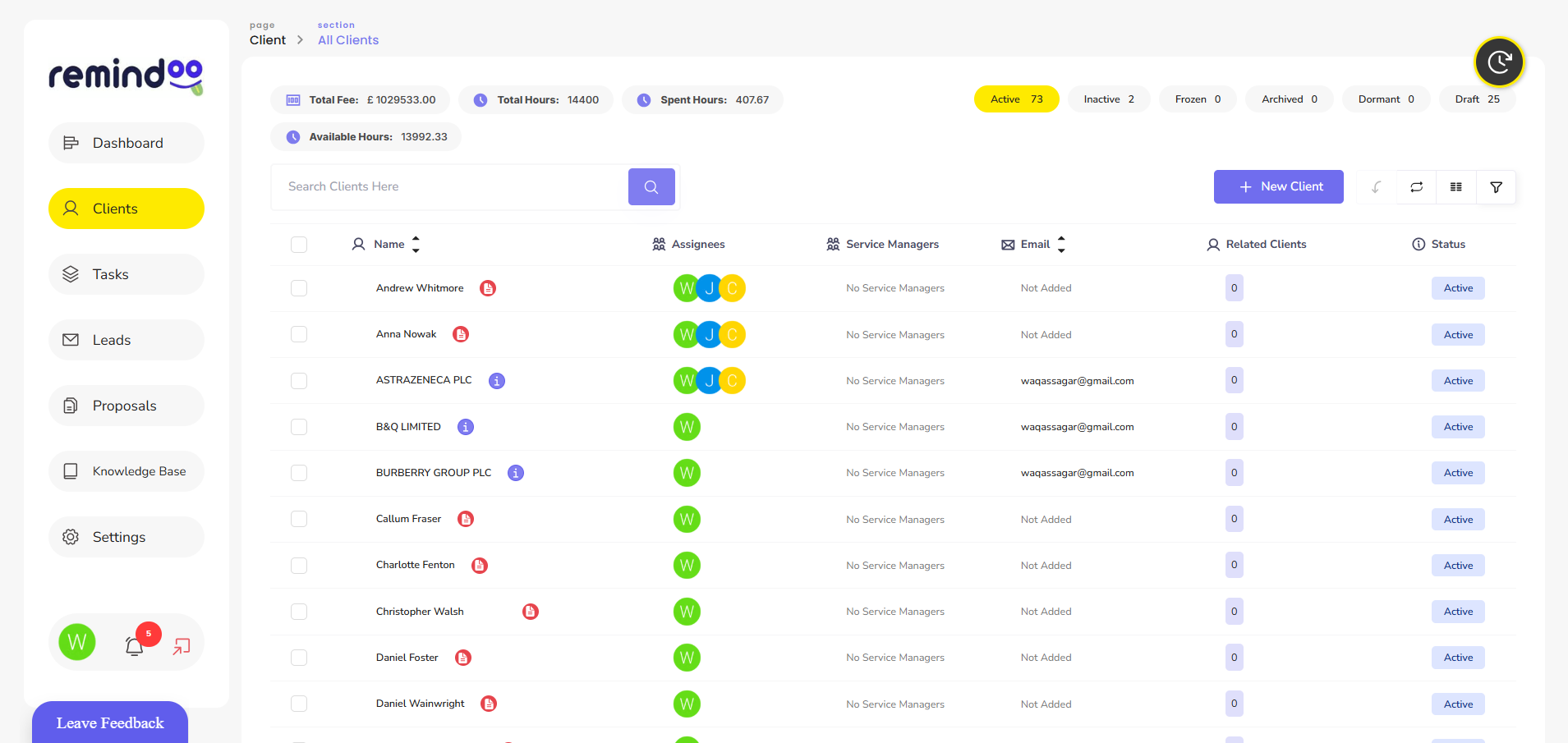
Cloud Based Accounting Practice Management Software: How It Can Transform Your Accounting Firm

Running an accounting practice involves much more than preparing accounts and submitting tax returns. Accountants and bookkeepers must manage client relationships, organise documents, monitor deadlines, coordinate staff and keep track of ongoing work. When these activities are handled through separate spreadsheets, emails and disconnected applications, administrative work can consume valuable time.
This is where cloud based accounting practice management software can make a difference. It gives accounting firms access to centralised tools for managing clients, organising workflows, tracking assignments and improving communication. Instead of relying on multiple disconnected systems, practices can manage many everyday operational activities through a shared online platform.
For UK accountancy firms looking to improve efficiency and manage growing client portfolios, cloud-based practice management offers a practical approach to organising daily operations.
This guide explores how the technology works, which features accounting firms should look for and how solutions such as Remindoo can support modern accounting practices.
What Is Cloud Based Accounting Practice Management Software?
Cloud based accounting practice management software is an online platform that helps accountants and bookkeepers manage the operational side of their practices.
Unlike traditional desktop systems that may depend on locally installed applications, cloud-based platforms allow authorised users to access information through an internet connection. Depending on the provider, users can work from office computers, laptops or mobile devices.
The software typically brings several practice management activities together, including:
-
Client information and relationship management.
-
Task allocation and workflow management.
-
Document sharing and client communication.
-
Deadline and compliance tracking.
-
Staff collaboration and workload monitoring.
-
Proposal management and client onboarding.
-
Practice performance reporting.
It is important to understand the distinction between accounting software and practice management software.
Accounting software primarily handles financial transactions, bookkeeping, invoicing and financial reporting. Practice management software focuses on how an accounting firm organises its clients, employees, assignments and internal processes.
Some platforms offer integrations or overlapping features, allowing firms to connect different parts of their operations.
Why Are UK Accounting Firms Moving Towards Cloud-Based Practice Management?
Accounting firms increasingly handle large volumes of client information and recurring responsibilities. Managing these activities manually can become difficult as a practice expands.
Cloud-based systems provide a central environment for organising work and improving visibility across the firm.
1. Access Practice Information From Different Locations
Traditional office-based systems can make remote working more difficult, particularly when employees need access to information stored on individual computers or local servers.
Cloud-based practice management allows authorised team members to access relevant information from different locations.
For example, an accountant working remotely can review an assigned task, check client information or update work progress without needing to be physically present in the office.
This flexibility can support firms with hybrid teams, multiple offices and employees working from home.
2. Reduce Manual Administrative Work
Accountants regularly perform repetitive administrative activities, such as sending client reminders, updating task lists, requesting documents and checking deadlines.
When these activities are handled manually, they can interrupt more important accounting work.
Practice management software can help automate selected processes through:
-
Automated task assignments.
-
Scheduled reminders.
-
Recurring workflow templates.
-
Client follow-up notifications.
-
Deadline monitoring.
-
Automated status updates.
Automation does not eliminate the need for professional oversight. Instead, it reduces repetitive administration and allows employees to focus on reviewing financial information, advising clients and completing accounting work.
3. Improve Client Communication
Client communication is an important part of running an accounting practice.
Accountants regularly need to request bank statements, invoices, identification documents, expense records and other information. When communication takes place across multiple email threads, important requests can become difficult to track.
Cloud-based platforms can centralise client communication and provide structured ways to manage outstanding requests.
Features such as client portals, email management and automated reminders help firms maintain clearer communication records.
Clients can also benefit from having a more organised way to share information and respond to requests.
4. Improve Visibility Across the Accounting Team
Practice owners and managers need to understand how work is progressing across their teams.
Without a central task management system, managers may need to contact individual employees to find out which assignments are completed, pending or delayed.
Cloud-based practice management software provides a shared view of tasks and their current status.
Managers can use this information to:
-
Review employee workloads.
-
Identify overdue assignments.
-
Allocate work based on availability.
-
Monitor recurring responsibilities.
-
Identify workflow bottlenecks.
-
Track overall practice performance.
This makes it easier to coordinate work and identify operational issues before they affect client service.
Essential Features to Look for in Cloud Based Accounting Practice Management Software
Not every platform provides the same functionality. Before selecting a solution, accounting firms should evaluate whether its features match their operational requirements.
The following features are particularly useful for UK accountants and bookkeepers.
1. Centralised Client Management
A client management system provides a structured location for storing and reviewing client information.
Instead of searching through separate spreadsheets and email records, employees can access relevant client details through a central platform.
Useful capabilities include:
-
Client contact information.
-
Business and company details.
-
Assigned accountants and team members.
-
Client communication history.
-
Important documents.
-
Service and task records.
Centralised client management helps reduce administrative confusion and makes it easier for employees to understand each client's requirements.
2. Workflow and Task Automation
Accounting practices manage recurring activities throughout the year. These can include VAT returns, payroll processing, bookkeeping, annual accounts and tax return preparation.
A workflow management feature helps firms create repeatable processes for these activities.
For example, a VAT return workflow could include:
-
Assigning the VAT task to an accountant.
-
Requesting the required financial documents.
-
Reviewing the client's bookkeeping information.
-
Preparing the VAT return.
-
Completing the necessary checks.
-
Recording submission and completion.
A structured workflow makes responsibilities clearer and helps teams follow consistent procedures.
3. Deadline and Compliance Tracking
Missing an important deadline can create unnecessary problems for both accounting firms and their clients.
A practice management system should make it easier to monitor recurring deadlines and outstanding responsibilities.
Depending on the platform, this may include:
-
VAT return deadlines.
-
PAYE and payroll reporting dates.
-
Corporation Tax responsibilities.
-
Self Assessment deadlines.
-
Annual accounts filing dates.
-
Companies House filing reminders.
For example, accountants managing several limited companies can use deadline tracking to monitor upcoming confirmation statements and annual accounts filing dates.
The software should allow firms to assign responsibility for each deadline and track progress towards completion.
4. Secure Client Portal and Document Management
Accounting firms regularly exchange confidential financial and business information with clients.
A client portal provides a structured environment for sharing documents and requesting information.
Useful document management capabilities include:
-
Uploading and downloading files.
-
Organising documents by client.
-
Managing access permissions.
-
Tracking outstanding document requests.
-
Maintaining organised client records.
Security should be a major consideration when evaluating these features. Firms should review encryption, access controls, authentication, backup arrangements and data retention policies before choosing a provider.
5. Email Management and Triage
Email remains one of the main communication channels between accountants and their clients.
However, managing hundreds of emails can make it difficult to identify urgent requests and outstanding actions.
Email triage features can help categorise incoming messages, identify important communications and direct work to the appropriate team members.
Some modern platforms also use artificial intelligence to summarise email conversations and highlight potential actions.
These tools can reduce time spent reviewing lengthy email threads, although employees should always check AI-generated summaries before relying on them.
6. Reporting and Practice Analytics
Practice owners need accurate information to understand how their business is performing.
Reporting and analytics features can help monitor:
-
Number of active clients.
-
Completed and outstanding tasks.
-
Employee workloads.
-
Overdue assignments.
-
Workflow completion rates.
-
Practice activity and productivity.
These insights can support better resource allocation and operational planning.
For example, if a practice regularly experiences delays during VAT return periods, managers can review workload information and adjust task allocation before the next reporting cycle.
7. Proposals and Client Onboarding
Bringing a new client into an accounting practice involves several administrative steps.
These may include gathering business information, issuing engagement proposals, completing identity checks and collecting the documents needed to begin work.
Practice management software can help organise these activities through structured onboarding workflows.
Useful features may include:
-
Digital proposals.
-
Engagement management.
-
Client information collection.
-
AML and identity verification workflows.
-
Document requests.
-
Client onboarding progress tracking.
Firms should ensure that their onboarding procedures meet applicable anti-money laundering and professional obligations. Software can support these procedures, but it does not replace the accountant's responsibility to carry out appropriate checks.
How Cloud-Based Practice Management Supports Making Tax Digital
Making Tax Digital (MTD) is an important consideration for UK accounting firms.
MTD requires relevant businesses to maintain digital records and use compatible software for applicable submissions to HMRC.
For accountants and bookkeepers, this increases the importance of organised digital record-keeping and clear client processes.
Under the current MTD for Income Tax rules, qualifying sole traders and landlords must use compatible software to maintain relevant digital records, send quarterly updates and submit their tax returns.
Cloud based accounting practice management software can support the administrative side of this process through:
-
Tracking client MTD requirements.
-
Recording important reporting deadlines.
-
Assigning quarterly update responsibilities.
-
Sending client reminders.
-
Organising supporting documents.
-
Monitoring outstanding work.
However, an important distinction is necessary: practice management software is not automatically MTD-compatible accounting software. Firms must confirm that the software they use for digital records and HMRC submissions meets the applicable requirements.
Accountants can read the official HMRC guidance on choosing the right software for Making Tax Digital for Income Tax.
How to Choose the Right Cloud-Based Practice Management Software
Selecting practice management software requires more than comparing feature lists. Firms should consider their existing processes, client requirements, team size and future growth plans.
Here are several factors to evaluate before making a decision.
Understand Your Practice Requirements
Start by identifying the activities that create the most administrative work.
For example, a small bookkeeping firm might prioritise client communication, document collection and task tracking. A larger accountancy practice may need more advanced workflow automation, reporting and employee management.
Choose a platform that addresses your actual operational challenges rather than paying for features your team will rarely use.
Check Ease of Use
Software should make everyday work easier, not introduce additional complexity.
Consider whether employees can easily:
-
Find client information.
-
Create and assign tasks.
-
Update work progress.
-
Access relevant documents.
-
Monitor deadlines.
-
Communicate with clients.
A straightforward interface can make implementation easier and reduce the amount of staff training required.
Evaluate Security and Data Protection
Accounting practices handle sensitive client and financial information. Security should therefore be a central part of the software selection process.
Check whether the provider offers:
-
Encryption in transit and at rest.
-
Role-based access permissions.
-
Multi-factor authentication.
-
Secure data storage.
-
Regular backups.
-
Clear data retention policies.
-
Appropriate data processing agreements.
UK firms should also consider their responsibilities under UK GDPR and applicable data protection legislation.
Review Integrations
Most accounting firms already use several digital tools.
Before choosing a practice management platform, check whether it works with the accounting, payroll, communication and document management systems your firm already uses.
Useful integrations can reduce duplicate data entry and improve the flow of information between applications.
Consider Pricing and Scalability
Software costs can vary depending on the provider, number of clients, number of users and available features.
Compare the pricing structure with your expected usage.
It is also worth considering whether the platform can support a growing client portfolio without requiring a complete change of systems.
How Remindoo Helps Modern Accounting Practices Manage Their Work
Remindoo is an AI-powered practice management platform developed for UK accountants and bookkeepers.
It brings together tools designed to help accounting practices organise client information, manage workflows, monitor responsibilities and improve team coordination.
Rather than handling every operational activity separately, practices can use a central platform to manage important parts of their daily work.
Client Management and Client Portal
Managing client information across different systems can create unnecessary administrative work.
Remindoo provides client management capabilities that help firms organise client records and manage ongoing relationships.
Its client portal also supports structured communication and document exchange, helping practices organise interactions with their clients.
Workflow Management and Automation
Recurring accounting responsibilities require consistent processes.
Remindoo provides workflow features that help firms organise assignments, allocate responsibilities and monitor task progress.
This can be particularly useful for practices managing regular bookkeeping, VAT, payroll and annual accounts work.
Email Triage and AI Summaries
Accountants often receive lengthy client email conversations containing multiple questions and outstanding requests.
Remindoo includes email triage and AI-powered summarisation features designed to help users review communications and identify relevant actions more efficiently.
These features can help reduce time spent navigating email conversations while keeping employees involved in reviewing and responding to client matters.
Compliance and Deadline Tracking
Accounting firms need to monitor multiple recurring client responsibilities.
Remindoo supports tracking for important areas such as VAT, Corporation Tax, PAYE and Self Assessment.
It also provides reminders to help teams monitor upcoming responsibilities and reduce the risk of overlooking important tasks.
Proposals and AML Management
Client onboarding requires firms to collect relevant information and complete appropriate checks.
Remindoo includes proposal and AML-related workflow capabilities to help practices organise these activities.
This provides a more structured approach to onboarding new clients and managing related administrative requirements.
Companies House Synchronisation
Keeping company information organised is important for accountants managing multiple limited-company clients.
Remindoo includes Companies House synchronisation capabilities to support access to relevant company information and help practices manage company-related administration.
Analytics and Practice Insights
Understanding how a practice operates is essential for making informed management decisions.
Remindoo provides analytics features that help firms review practice activity and gain visibility into their workflows and operations.
This can support better workload management and help practice owners identify areas where processes may need improvement.
Common Mistakes to Avoid When Implementing Practice Management Software
Even a feature-rich platform may fail to deliver its intended benefits if implementation is poorly managed.
Accounting firms should avoid the following mistakes.
Moving to Software Without Reviewing Existing Processes
Simply transferring existing spreadsheets and task lists into a new platform may not solve underlying operational problems.
Review your current processes first. Identify duplicated tasks, unnecessary approval steps and communication gaps before configuring the software.
Ignoring Staff Training
Employees need to understand how the platform fits into their daily responsibilities.
Provide practical training and establish clear procedures for creating tasks, updating statuses, managing documents and communicating with clients.
Using Too Many Disconnected Applications
Introducing another application without considering existing systems can increase complexity.
Review your current software and identify where integrations or consolidated workflows could reduce unnecessary switching between tools.
Failing to Maintain Accurate Client Information
Practice management software depends on reliable information.
Outdated contact details, incorrect client assignments and incomplete records can affect task allocation and communication.
Establish a process for reviewing and updating client information regularly.
Assuming Automation Removes the Need for Human Checks
Automated reminders, AI summaries and workflow updates can improve efficiency, but they do not replace professional judgement.
Employees should continue reviewing important financial information, client communications and compliance-related activities.
Frequently Asked Questions About Cloud Based Accounting Practice Management Software
What is cloud based accounting practice management software?
Cloud based accounting practice management software is an online system that helps accountants and bookkeepers manage clients, tasks, workflows, deadlines, documents and team activities through a central platform.
How is practice management software different from accounting software?
Accounting software focuses on financial activities such as bookkeeping, invoicing, bank reconciliation and financial reporting. Practice management software focuses on managing the accounting firm's internal operations, client relationships, employee workloads and recurring assignments.
Is cloud-based practice management software suitable for small accounting firms?
Yes. Small accounting firms can use cloud-based platforms to organise client records, automate reminders, manage recurring work and improve communication. The right solution depends on the firm's size, requirements and budget.
Is cloud accounting practice management software secure?
It can be secure when the provider implements appropriate security measures, including encryption, access controls, authentication and regular backups. Accounting firms should review the provider's security documentation and data protection arrangements before storing client information.
Can practice management software help with Making Tax Digital?
Practice management software can help accountants organise client responsibilities, monitor deadlines and coordinate MTD-related work. However, firms must separately ensure that the software used for digital record-keeping and HMRC submissions meets the relevant MTD requirements.
Does practice management software support remote accounting teams?
Yes. Cloud-based platforms allow authorised employees to access relevant practice information from different locations. This can support remote working, hybrid teams and collaboration across multiple offices.
What features should accountants look for in practice management software?
Important features include client management, workflow automation, deadline tracking, document management, client portals, email management, team collaboration, reporting and relevant software integrations.
Conclusion
Managing an accounting practice involves coordinating clients, employees, deadlines and recurring responsibilities. When these activities rely on disconnected applications and manual processes, administrative work can become difficult to manage as the practice grows.
Cloud based accounting practice management software provides a centralised way to organise these activities, improve team visibility and support more consistent workflows.
Before choosing a platform, accounting firms should evaluate its functionality, security, integrations, ease of use and ability to support future growth.
Remindoo brings together client management, workflow automation, email triage, compliance tracking, analytics and other practice management capabilities in one platform designed for UK accountants and bookkeepers.
For firms looking to organise their operations and improve the way they manage client work, exploring a cloud-based practice management solution can be a useful next step.