

Cloud-Based Practice Management: How Accounting Firms Can Improve Efficiency and Client Management

Accounting firms manage numerous responsibilities every day, from responding to client enquiries and preparing accounts to tracking deadlines, allocating work and maintaining compliance records. As a practice grows, managing these activities through spreadsheets, emails and disconnected systems can become increasingly difficult.
Cloud technology offers a more organised approach. Cloud based accounting practice management software allows accounting firms to manage clients, coordinate employees, organise workflows and monitor tasks through a centralised online platform.
Rather than relying on separate tools for every activity, practices can bring important administrative processes together and improve visibility across their operations.
What Is Cloud-Based Accounting Practice Management Software?
Cloud based accounting practice management software is an online system designed to help accountants organise and manage their daily practice operations.
Unlike traditional desktop systems that depend on locally installed software, cloud-based platforms can be accessed through an internet connection using supported devices.
Depending on the platform, features may include:
-
Client and contact management
-
Task and workflow management
-
Client portals
-
Document management
-
Deadline and reminder tracking
-
Employee task allocation
-
Proposal and AML management
-
Reporting and performance monitoring
-
Email and communication management
These tools help accounting firms organise their internal processes and maintain a clearer overview of client work.
It is important to distinguish practice management software from accounting software. Accounting software primarily handles financial transactions, bookkeeping and financial reporting. Practice management software focuses on how an accounting firm manages its clients, employees, jobs and internal operations. Some platforms integrate with accounting applications to support both areas.
Why Are Accounting Firms Moving Towards Cloud-Based Systems?
Traditional practice management methods can create administrative challenges as the number of clients and employees increases.
For example, an accountant might track deadlines in a spreadsheet, communicate with clients through email, allocate work through messaging applications and store documents in separate folders. Information becomes difficult to locate when these systems are not connected.
Cloud-based systems can address these challenges by providing a shared working environment.
1. Access Practice Information Remotely
Cloud technology allows authorised employees to access practice information without being restricted to a particular office computer.
This can support firms with remote employees, multiple office locations or flexible working arrangements.
Team members can check assigned tasks, review client information and monitor work progress from supported devices. Access permissions should be configured carefully to ensure employees only see information relevant to their responsibilities.
2. Improve Client Management
Managing client information is an important part of accounting practice operations. Firms need to maintain contact details, service information, communication records and relevant deadlines.
A centralised client management system helps employees locate information without searching through multiple spreadsheets and email conversations.
For example, an accounting firm can organise client records by service type, assigned employee or work status. This makes it easier to understand which clients require attention and what work remains outstanding.
3. Organise Accounting Workflows
Accounting firms often complete similar activities for multiple clients. These may include bookkeeping, VAT submissions, payroll processing, annual accounts and tax return preparation.
Without consistent workflows, employees may overlook individual steps or spend unnecessary time coordinating routine activities.
Practice management software can help establish repeatable processes by organising work into tasks, subtasks, stages and deadlines.
Managers can assign responsibilities, monitor progress and identify outstanding work. This creates a more structured approach to completing recurring accounting activities.
How Workflow Automation Reduces Administrative Work
Automation is one of the most useful capabilities available in modern practice management platforms.
Many accounting tasks follow predictable patterns. For example, a client may need regular bookkeeping reviews, VAT preparation and payroll processing.
Instead of manually creating every task, firms can use automated workflows to generate recurring activities and assign responsibilities.
Automation can support:
-
Recurring task creation
-
Deadline reminders
-
Employee task allocation
-
Workflow status updates
-
Client follow-up notifications
-
Repetitive administrative processes
These capabilities can reduce manual coordination and help employees concentrate on work requiring professional judgement.
However, automation should be reviewed regularly. Incorrect task rules or outdated deadlines can create problems if automated processes are not maintained.
The Importance of Client Portals in Accounting Practices
Communication is a significant part of accounting practice management. Accountants regularly request documents, clarify financial information and update clients about ongoing work.
When communication takes place across several channels, important information can become difficult to track.
A client portal provides a more organised way for clients and accounting teams to exchange information through a central online environment.
Depending on the platform, client portals may support:
-
Secure document sharing
-
Client information collection
-
Requests for missing documents
-
Communication records
-
Access to relevant service information
-
Progress updates
A well-organised portal can reduce repeated email exchanges and provide clients with a clearer way to interact with their accountants.
Managing Deadlines and Compliance Responsibilities
Accounting firms work with numerous statutory and internal deadlines. These may include VAT returns, PAYE submissions, Corporation Tax, Self Assessment and annual accounts.
Missing a deadline can create additional work and potentially lead to financial penalties for clients.
A practice management system can help firms organise these responsibilities by recording relevant dates, creating reminders and assigning tasks to employees.
For example, a manager can allocate a VAT-related task to an accountant, establish an internal completion date and monitor progress before the submission deadline.
For UK firms, it is also important to understand the relevant Making Tax Digital requirements. HMRC provides guidance on choosing software and preparing accounting practices for digital reporting.
Useful official guidance: HMRC – Get ready for Making Tax Digital: An agent toolkit.
Practice management software can help organise internal responsibilities, but firms should separately verify that their accounting and submission software meets the applicable HMRC requirements.
Improving Team Collaboration and Work Allocation
As an accounting firm expands, managers need to understand how work is distributed across the team.
Without clear task allocation, some employees may become overloaded while other team members have available capacity.
Cloud-based practice management systems can provide a shared view of assignments, responsibilities and work progress.
Managers can use these features to:
-
Assign tasks to individual employees.
-
Establish priorities and completion dates.
-
Monitor pending and completed work.
-
Identify overdue activities.
-
Review team workloads.
-
Reallocate tasks when circumstances change.
This improves operational visibility and helps managers make more informed decisions about resource allocation.
Security and Data Protection Considerations
Accounting firms handle sensitive financial and personal information. Choosing cloud-based software therefore requires careful consideration of security and data protection.
Before adopting a platform, firms should assess:
User access controls: Employees should have permissions appropriate to their responsibilities.
Multi-factor authentication: Additional authentication can provide another layer of protection against unauthorised access.
Data encryption: Firms should understand how information is protected during transmission and storage.
Backup and recovery: Providers should explain their backup arrangements and procedures for recovering information.
Data protection responsibilities: Firms should understand their obligations under UK GDPR and relevant data protection legislation.
Provider reliability: Service availability, support arrangements and incident response procedures should be assessed before implementation.
Cloud software does not automatically guarantee security. Accounting firms remain responsible for assessing risks and managing client information appropriately.
How to Choose the Right Practice Management Platform
Not every accounting practice has the same operational requirements. A small firm may need straightforward client management and task tracking, while a larger practice may require advanced workflow automation and reporting.
Before selecting a platform, firms should consider the following factors.
Ease of Use
The system should be straightforward for employees to navigate. Complicated interfaces can increase training requirements and reduce adoption.
Integration Capabilities
Check whether the platform works with existing accounting, tax, communication and document management applications.
Workflow Customisation
Different accounting services involve different processes. A suitable system should allow firms to organise workflows according to their operational requirements.
Client Communication Features
Consider whether the software provides a client portal, document-sharing facilities and tools for managing communication.
Reporting and Visibility
Managers should be able to understand task progress, outstanding work and team responsibilities without relying entirely on manual updates.
Scalability
The platform should support the firm's expected growth in clients, employees and service requirements.
How Remindoo Supports Modern Accounting Practice Management
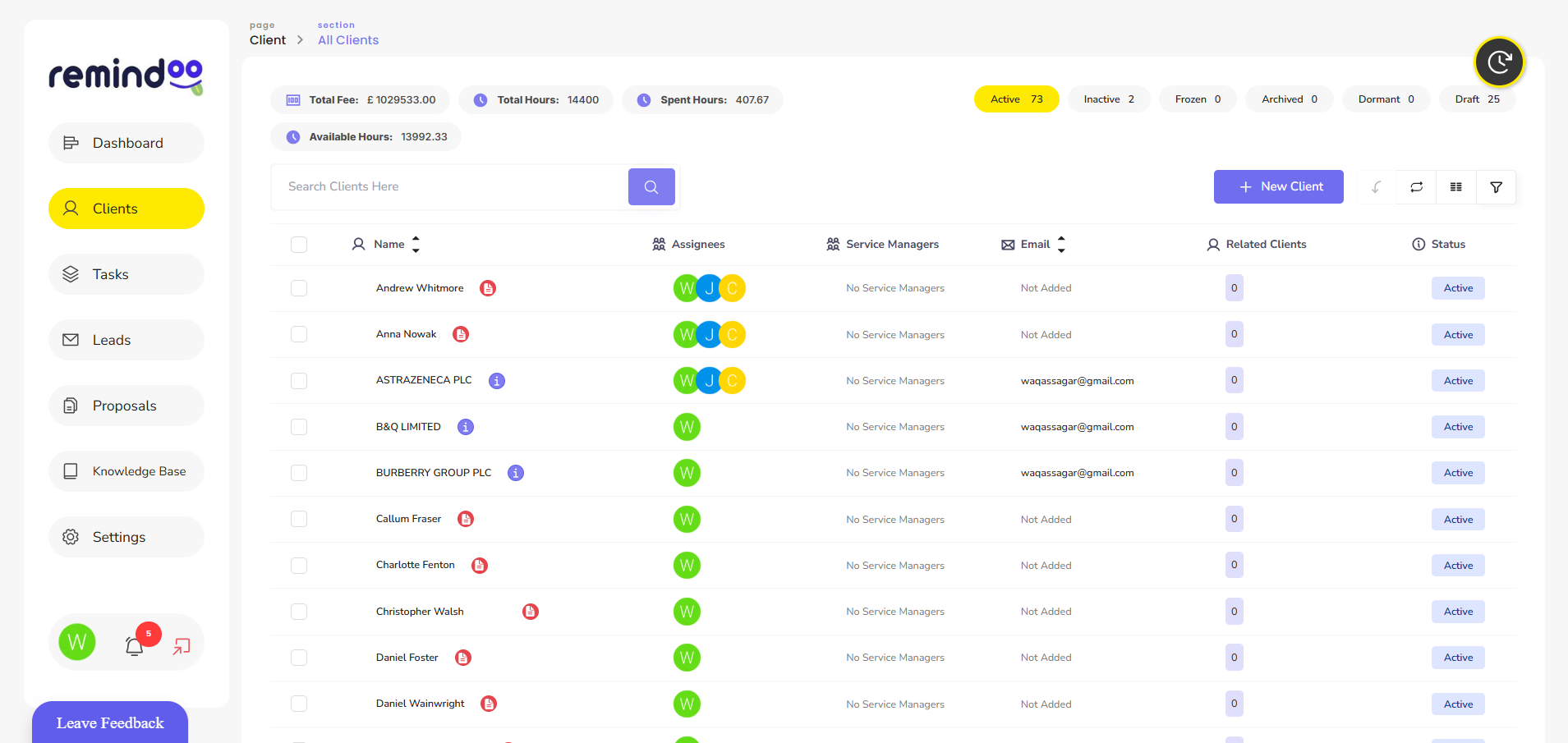
Remindoo is an example of a cloud-based practice management platform developed for UK accountants and bookkeepers.
Its features bring several practice management activities into one working environment, helping firms organise their internal operations and client-related responsibilities.
For example, Remindoo provides tools for client management, task allocation, workflow automation and client portal communication.
Its practice management capabilities also include proposals and AML processes, email triage, deadline tracking, templates and reporting features.
These tools address common operational challenges faced by accounting firms, particularly when managing multiple clients and recurring responsibilities.
The objective of using a platform such as Remindoo is not simply to move existing administrative tasks online. It is to create more organised processes, improve visibility and make routine practice management activities easier to coordinate.
The suitability of any platform will depend on the firm's size, existing systems and individual requirements.
The Future of Cloud-Based Accounting Practice Management
Technology continues to influence how accounting firms organise their operations. Cloud platforms, workflow automation and artificial intelligence are creating opportunities to reduce repetitive administration and improve access to business information.
AI-assisted summaries, automated task suggestions and intelligent communication management can help employees organise information more efficiently.
However, these technologies should support rather than replace professional judgement. Accountants must continue reviewing financial information, checking important details and making decisions based on their expertise.
Firms that adopt technology strategically can establish more consistent working processes while maintaining appropriate oversight of their operations.
Conclusion
Managing an accounting practice involves coordinating clients, employees, deadlines and recurring responsibilities. Disconnected systems can make these activities more difficult as a firm grows.
Cloud based accounting practice management software provides a centralised way to manage client information, organise workflows, automate routine tasks and improve team collaboration.
Platforms such as Remindoo demonstrate how cloud-based tools can support modern accounting practices by bringing important operational activities together.
Choosing the right system requires careful consideration of usability, security, integration and workflow requirements. With suitable technology and well-defined processes, accounting firms can improve operational organisation and build a stronger foundation for future growth.

