

How Workflow Software for Accountants Improves Practice Efficiency and Client Management

Running an accountancy practice involves more than preparing tax returns and maintaining financial records. Accountants must manage client requests, organise documents, monitor deadlines, allocate work and maintain regular communication. When these activities rely on spreadsheets, emails and manual reminders, important tasks can become difficult to track.
Workflow software for accountants provides a structured way to organise these responsibilities. It helps firms manage recurring activities, assign work to employees, monitor progress and maintain visibility across multiple client accounts.
As accounting practices take on more clients and services, having a consistent workflow becomes increasingly important. The right software can help reduce administrative pressure, improve team coordination and create a more organised client experience.
What Is Workflow Software for Accountants?
Workflow software for accountants is a digital practice management solution that helps accounting firms organise and monitor their daily operations.
Instead of managing every activity through separate spreadsheets, emails and calendars, accountants can use a central platform to coordinate work.
Depending on the software, common capabilities include:
-
Task management: Create, assign and monitor individual tasks.
-
Deadline tracking: Set reminders for tax returns, VAT submissions and other recurring responsibilities.
-
Client management: Store client information and maintain records of ongoing work.
-
Workflow automation: Automate repetitive administrative activities and follow-up reminders.
-
Document management: Organise important client documents and make them accessible to authorised team members.
-
Team collaboration: Allocate responsibilities and monitor individual workloads.
-
Progress reporting: Identify outstanding work, overdue activities and completed tasks.
These features help practices establish consistent processes rather than relying entirely on individual employees to remember every responsibility.
Why Do Accounting Firms Need Workflow Management Software?
An accounting practice may manage dozens or hundreds of clients, each with different reporting requirements, deadlines and communication preferences.
Without an organised system, employees may spend considerable time checking emails, chasing documents and updating task spreadsheets.
Workflow management software addresses several common operational challenges.
1. Managing Multiple Client Deadlines
Accountants work with different deadlines throughout the financial year. These may include VAT returns, payroll submissions, Corporation Tax returns and Self Assessment obligations.
Managing these responsibilities manually increases the risk of overlooking important activities.
Workflow software allows practices to create recurring tasks, assign deadlines and monitor completion. Managers can also identify outstanding work before deadlines become urgent.
2. Improving Team Task Allocation
When several employees work on different client accounts, unclear responsibilities can delay progress.
A central task management system makes it easier to allocate work according to employee responsibilities and availability.
For example, a practice manager can assign bookkeeping to one employee, review the completed records and allocate the next stage of the process to a qualified accountant.
This creates a clearer chain of responsibility and reduces unnecessary internal communication.
3. Reducing Repetitive Administrative Work
Many accounting activities follow similar processes every month, quarter or year.
Examples include:
-
Requesting bank statements and invoices.
-
Collecting payroll information.
-
Preparing VAT returns.
-
Reviewing bookkeeping records.
-
Sending deadline reminders.
-
Following up on outstanding client information.
Workflow automation can reduce the need to repeat these administrative steps manually.
Automated reminders and predefined task sequences help employees follow established procedures without creating every task from scratch.
4. Strengthening Client Communication
Delayed responses and missing documents can affect the delivery of accounting services.
A structured workflow makes it easier to identify which clients need attention and which documents remain outstanding.
Some practice management platforms also provide client portals, allowing clients to access relevant information and exchange documents through a central location.
This can make communication more organised and reduce dependence on lengthy email conversations.
Essential Features to Look for in Workflow Software for Accountants
Not every workflow platform is designed for accounting practices. General project management tools may offer task allocation but lack features that support accounting-specific responsibilities.
When evaluating workflow software for accountants, consider the following capabilities.
Client Management and Centralised Records
A client management system should make it easy to access relevant client information, communication records and ongoing assignments.
Centralised information reduces the need to search through multiple applications to understand the current status of a client account.
Automated Task Management
Look for software that supports recurring tasks, predefined workflows, automatic reminders and task assignment.
For example, a monthly payroll workflow could automatically create activities for collecting employee information, processing payroll, reviewing calculations and completing the required submissions.
Deadline and Progress Monitoring
A useful platform should provide an overview of upcoming deadlines, overdue tasks and completed assignments.
Dashboard reporting can help practice managers identify workload issues and distribute work more effectively.
Document Sharing and Client Portals
Secure document exchange is important because accounting firms regularly handle confidential financial information.
Consider whether the platform provides controlled document access, appropriate permissions and secure communication features.
Email and Software Integration
Accounting practices often use several applications for bookkeeping, communication, document storage and tax preparation.
Software integrations can reduce duplicate data entry and make information easier to access.
Before choosing a platform, check whether it integrates with the applications your practice already uses.
Reporting and Performance Tracking
Reporting features help managers understand how work moves through the practice.
Useful measurements include:
-
Number of outstanding tasks.
-
Overdue assignments.
-
Completed client work.
-
Employee workload.
-
Average task completion time.
-
Recurring workflow delays.
These insights can help managers identify inefficient processes and improve resource allocation.
How to Implement Workflow Software in an Accounting Practice
Introducing new software requires more than creating employee accounts. Accounting firms should first understand their existing processes and identify where improvements are needed.
The following steps provide a practical implementation approach.
Step 1: Identify Existing Workflow Problems
Review how your practice currently manages client onboarding, bookkeeping, payroll, VAT returns and tax preparation.
Identify activities that frequently experience delays or require repeated manual intervention.
For example, if employees regularly chase clients for missing invoices, introduce a standard document collection process.
Step 2: Create Standard Operating Procedures
Establish consistent procedures for recurring accounting activities.
A VAT return workflow might include:
-
Request financial records from the client.
-
Collect invoices and relevant supporting documents.
-
Review bookkeeping transactions.
-
Identify missing or incorrect information.
-
Prepare the VAT return.
-
Complete the internal review.
-
Submit the return and record completion.
-
Notify the client.
Documenting these stages makes responsibilities clearer and helps new employees follow established processes.
Step 3: Assign Responsibilities
Each workflow should have clearly defined ownership.
Assign tasks according to employee roles, experience and responsibilities. Establish who prepares the work, who reviews it and who approves completion.
This reduces confusion when several employees contribute to the same client assignment.
Step 4: Configure Automated Reminders
Set reminders for important activities and recurring deadlines.
For example, an accounting firm could configure reminders for monthly payroll information, quarterly VAT records and annual tax return preparation.
However, automated reminders should support professional oversight rather than replace it. Employees should still review deadlines and verify that statutory obligations have been met.
Step 5: Train Employees and Monitor Results
Provide practical training so employees understand how to create tasks, update progress, communicate with colleagues and manage client information.
Review the system regularly to identify unnecessary steps, duplicated activities and workflows that consistently experience delays.
How Remindoo Supports Accounting Practice Workflows
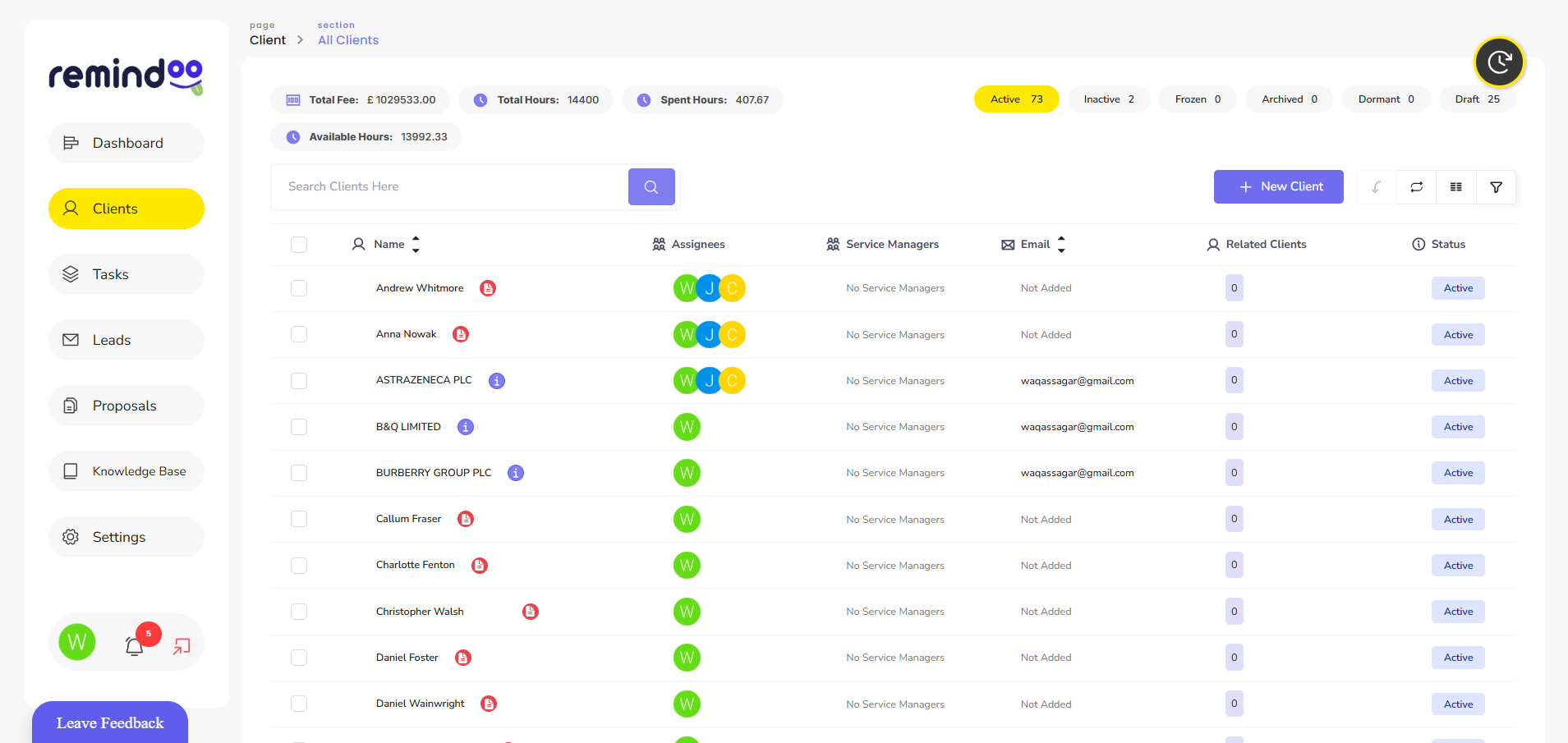
Accounting firms looking for a more organised approach to practice management can consider platforms such as Remindoo.
Remindoo is an AI-powered practice management platform designed for UK accountants and bookkeepers. It brings several operational activities together, helping practices manage client information, team responsibilities and ongoing work.
Its capabilities include:
Client management: Organise client information and manage ongoing client relationships through a centralised system.
Workflow management: Structure recurring activities and organise work across different stages of an accounting process.
Email triage: Help organise incoming email communication so teams can manage client requests more efficiently.
Client portal: Provide a central place for client interactions and document-related activities.
Analytics: Give practice managers greater visibility into operational activities and work progress.
AI-powered summaries: Help teams review relevant information and understand communication more efficiently.
Companies House integration: Support access to relevant company information within the practice management process.
The value of a platform such as Remindoo is not simply having more digital tools. It is bringing important practice activities into a more coordinated working environment.
Firms should evaluate available features against their actual operational requirements before choosing a practice management solution.
Workflow Software and Making Tax Digital: What Accountants Should Consider
Making Tax Digital (MTD) is changing how businesses maintain records and report information to HMRC.
For accounting practices, this creates additional operational considerations around client preparation, software compatibility and the allocation of responsibilities.
HMRC's guidance explains that affected taxpayers must use compatible software to maintain digital records and submit the relevant updates. Where multiple software products are used, digital records must be transferred through appropriate digital links.
Read the official HMRC guidance on creating digital records for Making Tax Digital for Income Tax.
Workflow management software can complement this process by helping practices organise supporting activities, such as:
-
Identifying clients who need assistance with MTD preparation.
-
Assigning software onboarding responsibilities.
-
Tracking outstanding client information.
-
Scheduling internal reviews.
-
Monitoring progress towards agreed deadlines.
-
Coordinating communication between accountants and clients.
It is important to distinguish between practice workflow management and tax compliance software. A workflow platform does not automatically become MTD-compatible simply because it helps accountants organise related tasks. Firms must verify that their tax and record-keeping software meets the relevant HMRC requirements.
Common Mistakes to Avoid When Choosing Accounting Workflow Software
Choosing software without understanding the practice's operational requirements can create additional work instead of improving efficiency.
Consider avoiding these common mistakes.
Choosing Software Based Only on Price
A low-cost solution may lack essential features such as recurring workflows, client management, reporting or integrations.
Compare the overall functionality against your firm's requirements rather than focusing exclusively on subscription costs.
Automating Inefficient Processes
Automation cannot solve every operational problem.
If an existing workflow contains unnecessary approvals or duplicated tasks, automating it may simply make the inefficient process happen faster.
Review and simplify processes before introducing automation.
Ignoring Data Security
Accounting practices handle sensitive financial and personal information.
Check user permissions, access controls, encryption, backup arrangements and data protection responsibilities before adopting a platform.
Firms should also consider their obligations under UK data protection legislation.
Failing to Train Employees
Even a feature-rich system may deliver limited value if employees do not understand how to use it.
Provide appropriate training and establish clear internal procedures for managing tasks and updating workflow progress.
Using Too Many Disconnected Applications
Moving between multiple disconnected platforms can create duplicated records and inconsistent information.
Evaluate integration capabilities and consider whether consolidating practice activities would improve the working process.
How to Measure the Success of Workflow Management Software
After implementation, accounting firms should measure whether their new system is improving operational performance.
Useful indicators include:
| Performance indicator | What it measures |
|---|---|
| Task completion rate | Percentage of assigned tasks completed |
| Overdue tasks | Work that remains incomplete after its deadline |
| Client response time | Time taken to respond to client requests |
| Document collection time | Time required to obtain outstanding client records |
| Workflow completion time | Time required to complete an accounting process |
| Employee workload | Distribution of work across the team |
| Administrative time | Time spent on repetitive coordination activities |
Compare these measurements before and after implementation. This provides a clearer understanding of whether the software is delivering practical improvements.
Final Thoughts
Managing an accounting practice requires consistent coordination between employees, clients and financial processes. As client numbers increase, manual task tracking and disconnected communication systems can make everyday operations more difficult.
Workflow software for accountants helps bring these activities into a structured environment. Features such as automated reminders, task allocation, client management and progress reporting can improve visibility and support more consistent service delivery.
The most suitable solution depends on the firm's size, existing processes, client requirements and software integrations. Platforms such as Remindoo provide accounting practices with tools to organise their operational activities and manage client relationships within a more connected practice management environment.
Ultimately, successful workflow management is about creating reliable processes that help accountants spend less time coordinating routine work and more time delivering valuable services to their clients.